File Sharing - Between XP and W7 (and vice versa)

   Information
This is a simple tutorial on how to create a share folder on windows XP/W7 and how to map to them from one machine to the other.

   Note
It is assumed that the two machines can ping one another over the network. "File and Printer sharing" on W7 to be turned ON. How you set up your machines to be able to ping one another is up to you.


Steps:

W7 to XP

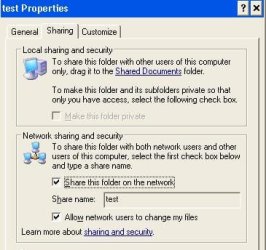
1) On XP, select the folder you wish to share, right-click > Sharing and Security. Then tick the boxes as shown (Here i have elected the test folder under C:\ to be my shared folder). Then click Apply and OK.
   Note
After the folder is shared, you will see the hand under the folder.
Noname.jpg
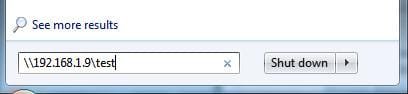
2) On W7, mapping to this test shared folder can be done in many ways. One way is typing in the search box under the Start menu as shown. Then hit Enter make sure the cursor is inside the box otherwise you will engage the shutdown box lol).
   Note
I have set manual IP to my XP machine, it's IP is 192.168.1.9
Noname1.jpg
Should you be prompted with logon credentials. Use the username and password with appropriate rights. Here I used the ID I log onto the XP machine with. You may need to put computername\username as the userid should the username alone doesn't work.

That's it, the explorer window will pop up and you now ready to share files. Just put any files in the folder from XP and it'll show up in the share.

XP to W7

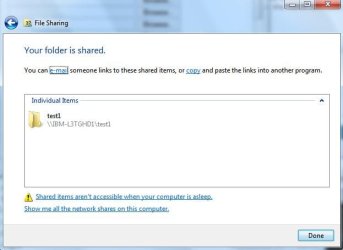
3) On W7, select the folder you wish to share, right-click > Sharing With. Then select Specific People (here i have elected the test1 folder under D:\ to be my shared folder). You will need to select who you want to share the folder to (here i have elected the userid with which i log onto W7 with. Highlight the name and Click the Share button. Then Done at the next screen.
Noname2.jpg
Noname3.jpg
4) As with point 2, Start > Run and type as shown. Then hit OK.
   Note
My IP to me W7 is 192.168.1.100

Noname4.jpg
Should you be prompted with logon credentials. Use the username and password with appropriate rights. Here I used the ID I log onto the W7 machine with. You may need to put computername\username as the userid should the username alone doesn't work.

That's it, the explorer window will pop up and you now ready to share files. Just put any files in the folder from W7 and it'll show up in the share.
Noname5.jpg

 
Last edited by a moderator:
XP connection to W7 share

I have completed and checked all the above. I have to restart the server on the W7 computer twice a day for the XP machines to see the shared folder on the W7. Any sugguestions?
 

My Computer My Computer

Computer type
PC/Desktop
OS
Window 7 and xp
My situation seems to be an outlier ...

I am successfully using my Win7 machine to host movies and videos for my Smart TV. I have a Sony Bravia. The TV sees the folder and can play many videos fine. My understanding is that this is partially hosted by Windows Media player on Win7 end. The movies must be in the path: "Administrator / My Videos"

If I use Windows Explorer on the Win7 machine I can play them fine on the PC screen too.

Problem comes when I want to view them on an XP machine. From the XP machine I can see and access everything shared from the Win7 machine EXCEPT this one path that will not access from the XP machine.
If I drag the movie from the above path to the root, I can view it on the XP machine. But the movie then cannot be viewed on the Smart TV.

Just how do i force Win7 to share this specific "Videos" folder ?

Its like every version of Windows CREATES more road blocks for the sole purpose of providing ample employment of techs FOR NO GOOD REASON. If it ain't broke, why must Microsoft continue to 'FIX IT'
 
Last edited:

My Computer My Computer

Computer type
PC/Desktop
OS
64
Hi,
I created a shared folder on my win 7 and followed all your suggestions. I made changes in Workgroup both in win 7 and xp pro sp3, and did all the things according to the article . But when i went to network share , i could see the folders i shared thro win 7, but getting access denied error. I have enabled everyone in both the machines. Would you say, why this happens. I could see the folder but could not access.
The xp is not pw protected . The win seven is also not pw protected. pl solution where i erred
 

My Computer My Computer

Computer type
PC/Desktop
Computer Manufacturer/Model Number
custom build
OS
Microsoft Windows 7 Ultimate 64-bit 7601 Multiprocessor Free Service Pack 1
CPU
Intel(R) Core(TM)2 Duo CPU E7200 @ 2.53GHz
Motherboard
To be filled by O.E.M. To be filled by O.E.M.
Memory
4.00 GB
Graphics Card(s)
NVIDIA GeForce 210
Sound Card
(1) NVIDIA High Definition Audio (2) Realtek High Definiti
Screen Resolution
1920 x 1080 x 32 bits (4294967296 colors) @ 60 Hz
Hard Drives
ST3500312CS ATA Device
Hi, i also want you to tell me that whether the storage of large files shared is having any impact on the accessing pc/laptop of different versions. I mean that if i share a folder , say having more video content tutorial to a laptop user by assigning suitable sharing permission, would the storage of that laptop pose some problems? or if he clicks on a large file, containing gb sizes,then would it affect the performance of the laptop. pl expecting replies
 

My Computer My Computer

Computer type
PC/Desktop
Computer Manufacturer/Model Number
custom build
OS
Microsoft Windows 7 Ultimate 64-bit 7601 Multiprocessor Free Service Pack 1
CPU
Intel(R) Core(TM)2 Duo CPU E7200 @ 2.53GHz
Motherboard
To be filled by O.E.M. To be filled by O.E.M.
Memory
4.00 GB
Graphics Card(s)
NVIDIA GeForce 210
Sound Card
(1) NVIDIA High Definition Audio (2) Realtek High Definiti
Screen Resolution
1920 x 1080 x 32 bits (4294967296 colors) @ 60 Hz
Hard Drives
ST3500312CS ATA Device
Hi, Please also include how to stop sharing a folder in your tutorial, as one would want to give access for some time only for the folders shared.
also say, why on disabling the sharing of a folder in the main computer sharing the contents, shows the previous folder shared
 

My Computer My Computer

Computer type
PC/Desktop
Computer Manufacturer/Model Number
custom build
OS
Microsoft Windows 7 Ultimate 64-bit 7601 Multiprocessor Free Service Pack 1
CPU
Intel(R) Core(TM)2 Duo CPU E7200 @ 2.53GHz
Motherboard
To be filled by O.E.M. To be filled by O.E.M.
Memory
4.00 GB
Graphics Card(s)
NVIDIA GeForce 210
Sound Card
(1) NVIDIA High Definition Audio (2) Realtek High Definiti
Screen Resolution
1920 x 1080 x 32 bits (4294967296 colors) @ 60 Hz
Hard Drives
ST3500312CS ATA Device
Back
Top